
A free online image measurement tool lets you take a distance, a size or an
angle straight from a photo, with no tape measure and no software to install.
You upload the picture, tell the tool how long one known thing is, and it
works out the rest.
That sounds simple, and it mostly is. But the results are only as good as
the photo and the way you set up the scale. This guide explains how these
tools work, walks through the steps, and covers the mistakes that throw
measurements off.
What Is a Free Online Image Measuring Tool?
A free online image measuring tool is a browser-based app that lets you
draw lines, angles or shapes on a picture and read off their size. Some
people call it a pixel ruler or an image dimension checker. The name
changes, but the job is the same: turn what you see on screen into a
real-world number.
How a Photo Measurement Tool Works
Every digital image is a grid of pixels. The tool can count how many
pixels a line covers, but pixels alone say nothing about inches or
centimeters. That is why you need a reference object something in the
photo whose real length you already know.
Once you enter that length, the tool calculates a scale:
real length = pixel length × (known length ÷ known pixel length)
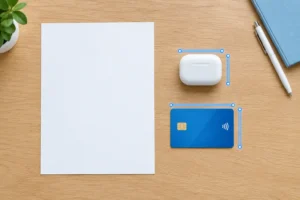
Say a bank card in your photo is 428 pixels wide. A standard ID-1 card is
85.6 mm wide, so each millimeter covers about 5 pixels. If a table edge
in the same photo spans 1,200 pixels, it is roughly 240 mm long.
What You Can Measure
Most tools handle straight distances, multi-point paths, angles and
sometimes areas. That covers a lot: the width of a shelf, the slope of a
roof in a photo, the length of a crack in a wall, the size of a part in a
product shot.
Why Use a free online image measurement tool?
The main reason is convenience. You do not always have a ruler in reach,
and sometimes the thing you want to measure is not in reach either. A photo
taken earlier, a picture sent by a client, a scan of a drawing: all of these
can be measured after the fact.
- Free and browser-based: they cost nothing and run in a normal browser.
- Cross-device: they work on a phone, tablet or laptop.
- Efficient: they let you measure many items from one photo instead of visiting each one.
- Quick estimates: they give you a fast number before you commit to a proper survey.
How to Use a free online image measurement tool, Step by Step
- Choose a good photo. Pick a sharp, well-lit image. Shoot the subject from straight on if you can, so the camera sits square to the surface. Angled shots stretch one side of the object and make the scale inaccurate.
- Upload the image and find a reference. Open the tool and upload your file. Look for a reference object in the same plane as the thing you want to measure. A ruler placed in the shot is ideal. A credit card, a coin or a sheet of A4 paper also works, as long as you know its true size.
- Calibrate the scale. Draw a line along the reference object from one edge to the other, then type in its real length and choose the unit. This calibration step is the most important part of the whole process. A careless click here carries through to every measurement afterward.
- Draw your measurements. Click the start and end points of whatever you want to measure. For an angle, mark the vertex and one point on each arm. Zoom in before placing points so you land on the true edge rather than a blurry one.
- Read, record and export. The tool shows the result in your chosen unit. Write the numbers down or export the annotated image if the tool allows it. If you need to convert between units, check that the tool supports pixels to cm and pixels to inches, or do the conversion yourself.
Tips for Accurate Results
Small habits make a big difference to how reliable a photo measurement
tool is.
Keep the Reference and the Subject on the Same Plane
If the reference sits closer to the camera than the object, it looks
bigger than it should, and every measurement comes out too small. Put the
two at the same distance from the lens.
Avoid Wide-Angle Distortion
Wide-angle lenses, including those on many phones, bend straight lines
near the edges. Take the photo from a bit further back, zoom in slightly,
and keep the subject near the center of the frame.
Use the Highest Resolution You Have
More pixels mean finer placement of your points. A tiny, compressed
image gives you a rough number at best.
Measure Twice
Calibrate again with a second reference if you have one, and compare. If
the two scales disagree, the photo has a perspective problem worth fixing
before you trust the data.
Common Uses for an Image Measuring Tool
People reach for a free online image measuring tool in many situations:
- Home and DIY: estimating wall lengths, furniture sizes or gaps before buying.
- Design and print: checking element sizes in a mockup or layout.
- Education: teaching scale, ratio and basic geometry with real pictures.
- Science and field work: sizing leaves, insects, cracks or other specimens photographed beside a ruler.
- Online selling: confirming product dimensions from a supplier’s photo.
Limitations to Keep in Mind
These tools give estimates, not certified measurements. Lens distortion,
camera tilt and a poorly chosen reference can all add error. For anything
that affects safety, structure or legal compliance, such as building
work, use physical measurement and a qualified professional. Treat the
photo method as a way to get close, quickly.
How to Choose a free online image measurement tool
Not every tool is built the same. When you compare options, look for:
- Calibration: a clear calibration step with unit selection.
- Measurement types: support for lines, angles and multi-point paths.
- Zoom: so you can place points precisely.
- Export: export or save options for your results.
- Privacy: a policy that says whether your image is uploaded to a server or processed in your browser. If your photos are sensitive, this matters.
- Accuracy depends entirely on a sharp, straight-on photo and a reliable reference object.
- Calibration is the single most important step errors there carry through every measurement.
- Treat results as fast estimates, not certified measurements, for anything safety- or legally-critical.
Frequently Asked Questions
What is a free online image measurement tool?
Is a free online image measuring tool accurate?
Do I need to install software?
What can I use as a reference object?
Can I measure angles as well as distances?
Why do my measurements look wrong?
Are my photos safe when I use an online tool?
Conclusion
A free online image measuring tool turns any photo into something you
can measure, as long as you give it a trustworthy scale. Start with a
sharp, straight-on picture, include a reference object of known size,
calibrate carefully, and zoom in when placing points. Do that, and you
will get useful numbers in a few minutes. For critical work, confirm the
result with a real tape measure.